Visitor management & National ID reading — now available on SignMe Cloud Try it now →
Mobile App for Egyptian National ID OCR
Mobile App · Android
Powered by AI

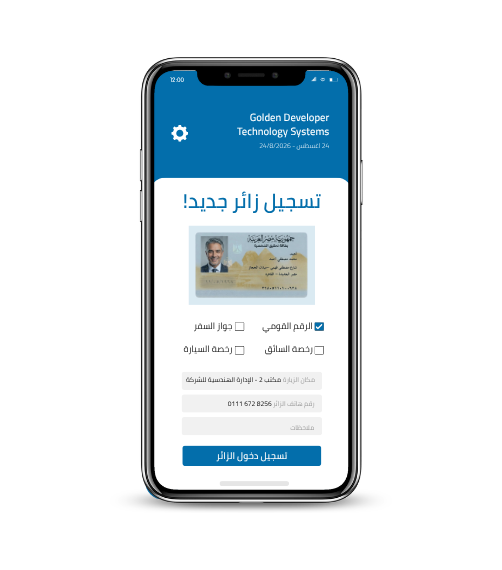
Mobile App for Egyptian National ID OCRPassports & Driver Licenses

Capture NID, driver license, and passport data with smart OCR in under 3 seconds. Auto-fills any app, syncs with your Visitor Management platform, and works offline.

Instant Field Capture

Extract ID data with the camera in under 3 seconds — even in poor lighting.

Auto-fill Any App

Smart keyboard fills data into any app — CRM, Excel, or WhatsApp.

Offline & Sync

Fully offline — data syncs automatically to your Visitor Management platform or MSSQL when reconnected.

01 Three core pillars

Built specifically for the field

If your team works in the field (sales, security, reception, delivery) — this app replaces multiple tools at once.

Pillar 01

Instant Field Capture

The agent points the phone camera at an NID, driver license, or passport. AI extracts every field in under 3 seconds — even in poor lighting.

  • Egyptian NID (new and old)
  • Global passport MRZ
  • Driver + vehicle licenses
  • Multi-document in one pass
Key feature
Pillar 02

Auto-fill in Any App

The SignMe virtual keyboard lets the agent type extracted data into any phone app — CRM, Excel, bank form, even WhatsApp. No copy/paste.

  • Smart virtual keyboard
  • Works with any phone app
  • Pick which fields to type
  • Zero manual entry errors
Pillar 03

Sync & Offline

The app works fully offline — essential in the field and low-connectivity areas. When connection returns, data syncs automatically to your Visitor Management platform, Excel, or MSSQL.

  • Fully offline-capable
  • Auto-sync with Visitor Management / CRM
  • Direct export to Excel / MSSQL
  • On-device data encryption
02 How it works

From opening the app to ready data — in 5 steps

Step 1

Open the app

Open SignMe Mobile on your phone. The app launches straight into the smart-scan screen.

Step 2

Pick the document type

NID, driver license, vehicle registration, or passport — one tap selects the right model.

Step 3

Aim and capture

Place the document in the on-screen frame; the camera auto-locks and captures.

Step 4

Smart OCR extracts data

In under 3 seconds, every field appears with a confidence score. The agent can review and edit if needed.

Step 5

Send or integrate

Push data to your Visitor Management platform, CRM, Excel, or MSSQL — or use the virtual keyboard to type into any app.

03 Inside the app

Simple screen, professional result

Designed so any agent can use it without long training. Each screen focuses on one task — capture, review, send.

Instant result preview
Each extracted field shows with confidence — so the agent can accept or rescan.
Re-scan in one tap
Poor lighting or unclear card? Re-scan fast without losing previous fields.
Fully Arabic UI
Native RTL layout, Cairo font, full understanding of Egyptian NID Arabic fields.
9:41
SignMe
● synced
NID Passport License
Place ID inside frame
Auto-capture: 2.1s
Last extraction · 0.6s ago
name:Mohamed H.
id:29809021234567
accuracy:99.8%
Capture
04 Use cases

Who benefits most from this app?

Insurance field agents
Issue a policy at the customer's home by scanning NID + license + vehicle.
Telecom retail reps
Activate SIM in retail without manual entry — zero NTRA fines.
Hotel reception
Check-in guest + driver + car at the gate — no front-desk PC needed.
Compound security
Scan visitor IDs at the gate and notify the host resident.
Delivery companies
Confirm recipient identity at the door for high-value deliveries.
Corporate security
Register building visitors without a fixed reception.
Hospital reception
Register companions in the ER quickly with no wait.
School gates
Verify guardian at child pickup with an NID scan.
05 Integrations

Integrates seamlessly with your stack

SignMe Visitor Management
Push visitors to central platform
Excel / CSV
Bulk export with one tap
MSSQL / Oracle
Direct DB connection
REST API
Connect to any system via JSON
CRM (D365 / Salesforce)
Capture customer leads
ANPR Hub
Link driver + plate data
Active Directory
Staff authentication
e-Signature
Digital signature on tablet
Security & Compliance

Enterprise security on every device

PDPL 151/2020

Customer data protected on device and in cloud with AES-256.

On-device encryption

Data stored encrypted on phone, accessible only to authorized agent.

Biometric login

Fingerprint, Face ID, or PIN to protect the app.

Offline-first design

Connection lost? Data is stored locally and uploaded later.

Audit log per action

Every capture logged with timestamp, location, agent, and device.

Remote device wipe

Lost phone? Admin can wipe SignMe data on it remotely.

Coming soon

Try the app on your field team

Book a 30-minute demo with our team. We'll show you the live mobile app, the virtual keyboard, and integration with your systems.

Android 8+
PDPL + GDPR
Local Arabic support