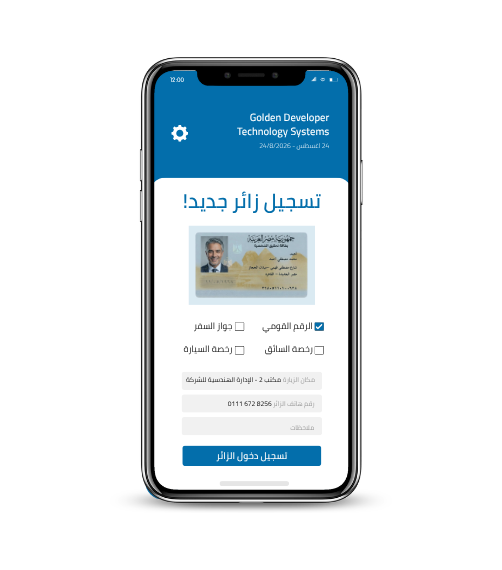
Mobile App for Egyptian National ID OCRPassports & Driver Licenses
Capture NID, driver license, and passport data with smart OCR in under 3 seconds. Auto-fills any app, syncs with your Visitor Management platform, and works offline.
Instant Field Capture
Extract ID data with the camera in under 3 seconds — even in poor lighting.
Auto-fill Any App
Smart keyboard fills data into any app — CRM, Excel, or WhatsApp.
Offline & Sync
Fully offline — data syncs automatically to your Visitor Management platform or MSSQL when reconnected.
Built specifically for the field
If your team works in the field (sales, security, reception, delivery) — this app replaces multiple tools at once.
Instant Field Capture
The agent points the phone camera at an NID, driver license, or passport. AI extracts every field in under 3 seconds — even in poor lighting.
- Egyptian NID (new and old)
- Global passport MRZ
- Driver + vehicle licenses
- Multi-document in one pass
Auto-fill in Any App
The SignMe virtual keyboard lets the agent type extracted data into any phone app — CRM, Excel, bank form, even WhatsApp. No copy/paste.
- Smart virtual keyboard
- Works with any phone app
- Pick which fields to type
- Zero manual entry errors
Sync & Offline
The app works fully offline — essential in the field and low-connectivity areas. When connection returns, data syncs automatically to your Visitor Management platform, Excel, or MSSQL.
- Fully offline-capable
- Auto-sync with Visitor Management / CRM
- Direct export to Excel / MSSQL
- On-device data encryption
From opening the app to ready data — in 5 steps
Open the app
Open SignMe Mobile on your phone. The app launches straight into the smart-scan screen.
Pick the document type
NID, driver license, vehicle registration, or passport — one tap selects the right model.
Aim and capture
Place the document in the on-screen frame; the camera auto-locks and captures.
Smart OCR extracts data
In under 3 seconds, every field appears with a confidence score. The agent can review and edit if needed.
Send or integrate
Push data to your Visitor Management platform, CRM, Excel, or MSSQL — or use the virtual keyboard to type into any app.
Simple screen, professional result
Designed so any agent can use it without long training. Each screen focuses on one task — capture, review, send.
Who benefits most from this app?
Integrates seamlessly with your stack
Try the app on your field team
Book a 30-minute demo and see the live app and its integrations.